
User testing to finalise a community page for an educational portal at MVP stage
“I did not have actual users to validate my ideas and there was just one POC from client side”
Educational Portal
Industry: Consumer Technology & Computing Devices I Domain - Enterprise Digital Solutions
PROJECT BACKGROUND
EDU Portal is one stop shop solution for IT administrators which aims to consolidate all educational tools and eliminate too many consoles, passwords, logins to get a Lenovo EDU advantage over its competitors.
The main users of this dashboard are IT Administrators. Eg. Solution admins, Org admins and IT admins
The client wanted to include a Community Page in it’s Educational portal for IT admins in design phase 1.
MY ROLE
Experience Designer involved in Requirement Gathering, Alignment with stakeholders, Research, prototypes, Visual Design AND Documentation
PROJECT DURATION
3 Weeks - Jun 2022
The Problem - Why user testing ?
Challenges
Design challenge for designing community page for MVP
-
No access to actual users
-
Not sure of information relevancy for the users as there were multiple pieces of information from multiple sources. Eg educational solutions, community groups, blogs, case study, events and webinars, help, knowledge base, bundles etc
-
No concrete feedback from PO
-
Design needed to be simple and easily feasible so that it can be taken to market for early feedback
-
Design explorations were done based on assumptions.
Design versions for community page for evaluation
Version 1
-
This version showed path to all the available items on the main page.
-
It also showed other information on main page like upcoming event and webinars, latest blogs, community groups and bundles
Version 2
-
This version focused on help section on first fold.
-
It focused more on presenting some actual content on the main page.
Objective
User testing goal
The goal of this testing was to provide insight for and gauge reactions to the Community pages of the Lenovo Education Portal 1st phase.
Things We Want to Learn :
Is information flow on community page good enough to understand or get an overview of the page?
Can an IT admin find the information as per his/her needs on the community page?
Is information provided on the community page relevant to IT admins?
What are some interest areas or topics for IT admin to explore on the community page?
Methodology
Unmoderated tests, using UserTesting.com tool. Sessions were divided in:
Community page Test 1 - Version 1 vs. Version 2 - Understanding of the page
-
6 participants divided in group A (3) and group B (3).
-
Each of them saw a different version of the prototype first.
-
Set 1 prototypes for group A
-
1st prototype - Version 1 main page
-
2nd prototype - Version 2 main page
-
-
Set 2 prototypes for group B
-
1st prototype - Version 2 main page
-
2nd prototype - Version 1 main page
-
Community page Test 2 - Findability and Content relevancy
-
Same Set for Level 2 pages
Total: 18 sessions
Sessions details:
-
Each session had a 8-15 min duration;
-
We gave the participant the context of the product;
-
Comparative usability evaluation based on a task;
-
Observe users interaction (we asked them to think out loud);
-
Questions were asked after each flow;
-
Mixed up prototypes order to mitigate bias.
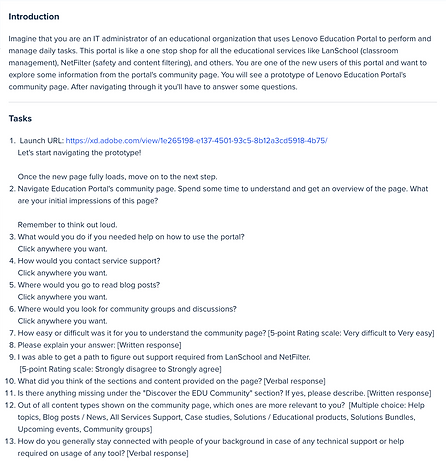
Planning the test and designing it on UserTesting tool.
Pre documentaion
A document was prepared where we defined testing goals, things we want to learn, screener questions, Scenario, Task questions, methodology.

Post documentaion
It was later designed in usability testing tool


Execution Stage
Live test


Participants
Participant data summary
For both test (Test 1 and test 2)
No Of Participants
Total - 14
Test 1 - 6
Test 2 - 8
Age Group & Location
24 yrs - 68 yrs
(all from US)
Industry
Higher Education
Education Management
E-Learning
Pri/ Sec Education
Seniority
Manager
Senior
Entry Level
Director
Owner

Main Activities at Work
- IT support and hands-on assisting
- Staff training
- Development of new solutions
- Software procurement
- Classroom monitoring and protection
- Cybersecurity, data protection or content filtering
- Device and/or infrastructure management

Summary of findings
Glimpse Of Report

WHAT WENT WELL
Test 1 - understanding of different versions of the Community page
It was very easy for all the users to understand and get an overview of the community page from version 1.
“Very easy to understand. Um, clean, not overwhelming, even though there's a lot of information”
“The layout of V1 is so much easier to look at and understand. The 10 topic boxes near the top of the page.”
“V1 helps me as the IT admin get right into Help and Support from the first page. It then offers me more support with community or product information.”
“The small cards without pictures to draw my eyes definitely worked better for me as far as readability and skimability goes.”
“I felt like I got a good overview of what was included in the Education Community on Version 1. It did not feel cluttered and it not feel like there was anything unnecessary. I felt like I could back to it and know just where everything is.”
Summary
Test 1 - Understanding of different versions of the community page
-
Ver 1 was much easier to understand.
-
Information type and application filtering options is useful
-
Quick accessibility to required information is must to have
Test 2 - Findability and content relevancy from the community page
-
It was very easy to find all the available options on the community page.
-
The top section “discover the EDU portal” gives a good summary of the community page and allows the user to see all options as per their needs and navigate the same.
-
It was easy for users to decide the path they should take due to self explanatory description on the main page top section
Thoughts and conclusion
-
Out of 2 versions of community page, ver 1 was a clear winner.
-
For phase 1 MVP repetition of information type on main page is not necessary as “Discover the EDU community” was satisfactory for the users to get an overview of available options on the community page and navigate the same.
-
Some improvements like, rephrasing description in top boxes, informing the user about navigating away from main portal, quick accessibility of important sections, showing services name upfront, sequencing relevant information type first in “discover the edu community section” , adding help option in it’s usual location.
How It Was Consumed By Stakeholders
Stakeholders reaction
-
The stakeholders were impressed to see the number of participant participated in the test.
-
All the positive feedbacks along with improvements made sense to them as it was backed up by different users.
-
Some of the minor feedback were greatly appreciated by them. Eg - “Having most common accessible topics at the very top of the portal home page is a great choice as most people are most likely coming to this portal for the covered topics. I would also add a warning of some sort (either smaller text or a small popup inside of the portal) that the Community Groups section will open another complete tab and navigate away from this portal.”
-
It was decided to separate the help section from the community page.
-
Out of many sections on community page, It was easier for the them to decide the most important section to proceed with for phase 1 design
Key Result Delivered
Design direction for MVP
User feedback to finalise community page design for MVP
They key result delivered was the report on hypothesis validation which helped the team and client to understand the expectation of the users from a community page.
Design delivered for MVP
Before user testing
-
The landing page required long scrolling, making it hard for users to quickly grasp the community structure.
-
Relevant information and groups were surfaced upfront without clear prioritization.
-
Users were redirected directly to different community URLs without prior context.
-
The Help section appeared in the first fold in one version, which limited users’ ability to get a clear overview of the education community.


After user testing
-
The experience was simplified into a single-fold landing page.
-
The page provided a clear overview of what the education community included, along with guided paths to specific information groups.
-
Users were explicitly informed when they were leaving the main portal and being redirected to external community URLs.
-
The Help section was separated from the community overview and relocated to a more intuitive, expected position on the page.


Design prototype
Final designs for MVP after user testing
UX Changes that drove impact
-
Simplified a long-scroll landing page into a single-fold, scannable overview.
-
Clearly communicated what the education community includes before users navigated deeper.
-
Introduced expectation-setting messaging for external redirects.
-
Relocated Help content to reduce cognitive load on first entry.